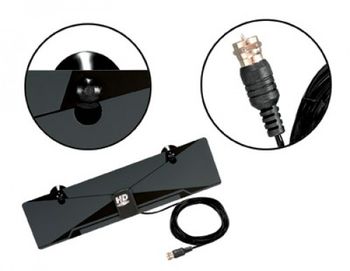
1 - HD Super Clear Digital Indoor Antenna
$14.95
Loading…
$69.95 - In stock
Estimated delivery: loading…
How do I set up or pair the Motorola H700 headset?
You must pair the H700 with a Bluetooth-enabled device. The setup involves placing the earloop around the ear. You can then use the multi-function button to control audio playback and answer calls.
What functions does the multi-function button perform on the H700?
The multi-function button is designed for hands-free communication. It allows you to answer or end phone calls and also controls audio playback when connected to a device.
Can the H700 headset be used for listening to music or podcasts?
Yes, the Bluetooth headset supports audio playback and can be used for music streaming and listening to podcasts. It connects wirelessly to your phone or other devices.
Is the H700 reliable for hands-free phone calls?
Yes, the H700 is designed specifically for hands-free calling and includes a visible microphone. It provides approximately 8 hours of talk time, which is sufficient for many calls.
What is the expected battery life of the H700?
The H700 provides approximately 8 hours of talk time, according to TechRadar reviews. This duration is sufficient for many typical uses.
Does the H700 support modern features like noise cancellation?
No, the H700 is an older model. Newer headsets generally offer improved features, such as noise cancellation and longer battery life, compared to this model.
What are the physical characteristics and design of the H700?
The H700 features a sleek, silver, over-ear design with an ergonomic earloop. It is described as lightweight and having a minimalist, modern aesthetic.
|
Check out these related products
No reviews yet. Be the first to review!